Turn your data into beautiful, interactive maps.

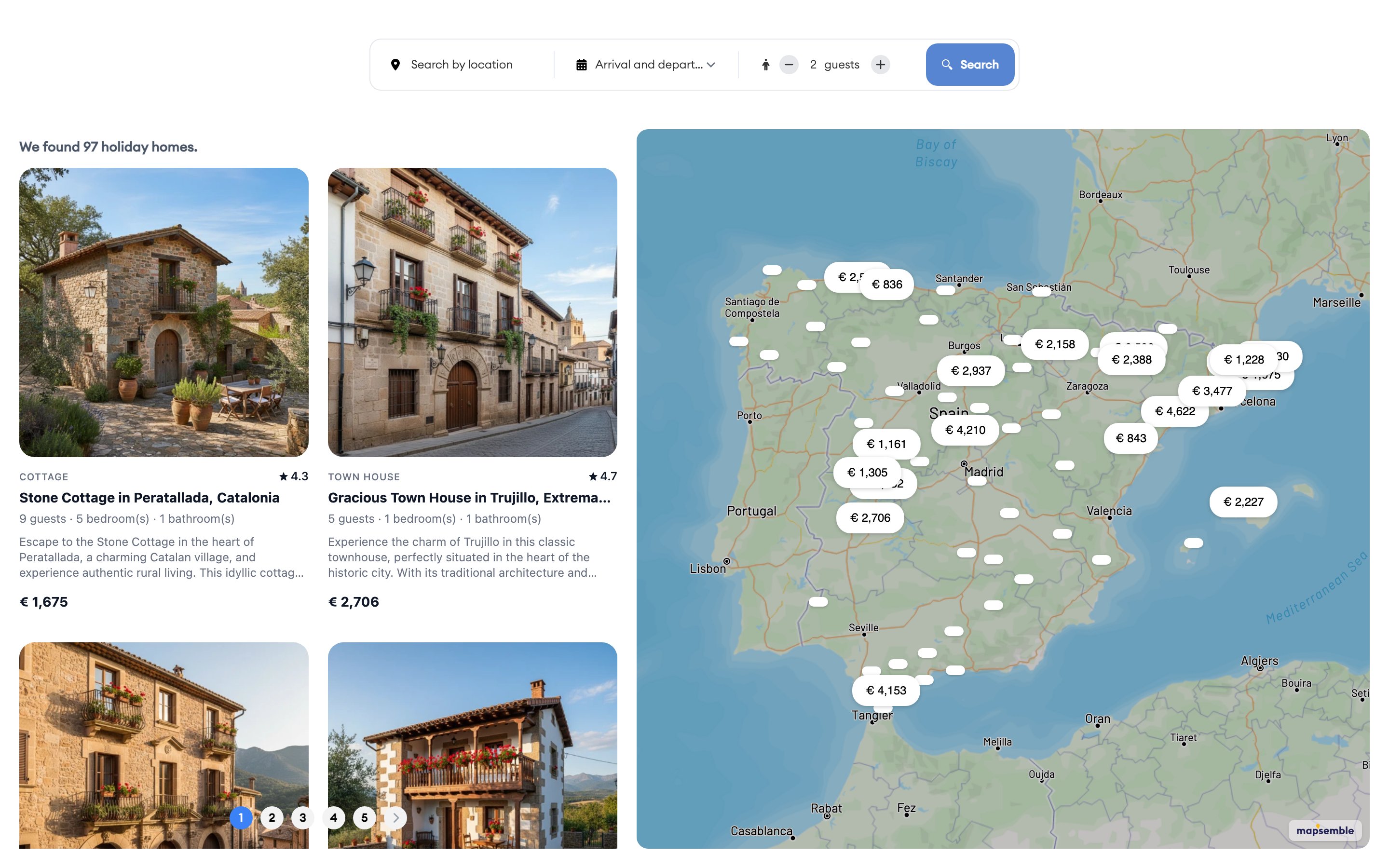
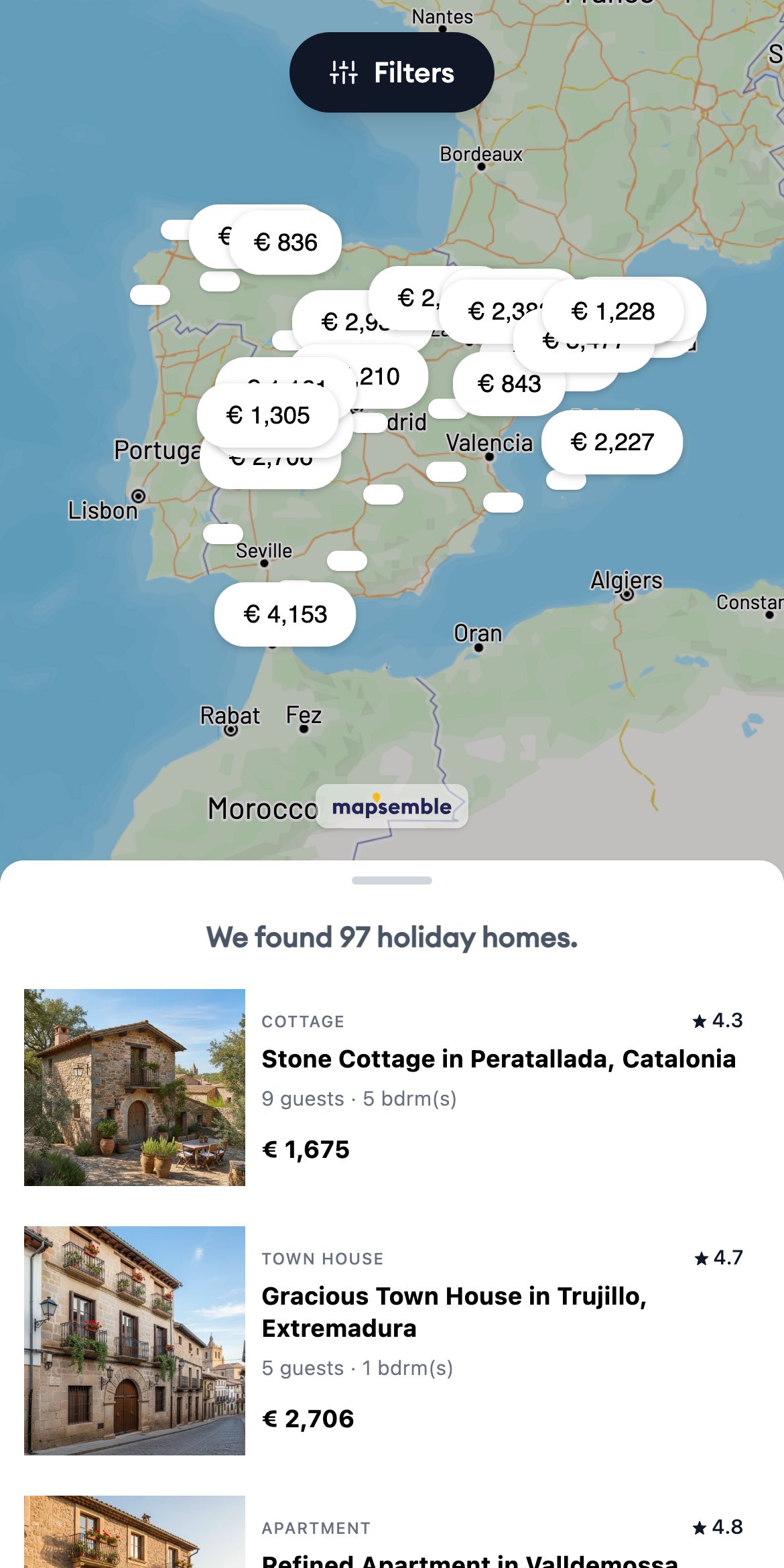
Build store locators, Airbnb-style maps or real estate listings.
Free up to 150 locations, flat-fee beyond that. Unlimited views included.

app.mapsemble.com
The Mapsemble builder: content list and settings beside a live preview of a holiday-homes map with search, result cards and price markers

Trusted by

“We implemented Mapsemble on our website and have seen a clear improvement in user engagement and conversions. The tool's usability and speed are truly top-notch.”
Arjan Nieuwbeerta
Arjan Nieuwbeerta
Marketing Manager, Fijnopvakantie.nl
“Mapsemble collaborated with our development team to create the best possible integration. With visitors in the 10k per day range, we are very happy with the flat fee Mapsemble offers.”
Marleen Brekelmans
Marleen Brekelmans
Founder, Bijzonderplekje.nl

This is what building one looks like

No screenshots of a demo we built for the brochure — these are the three panels you spend your time in, on a real map.

The Mapsemble builder editing a Property Type field: a single-select with the options Apartment, House, Villa and Studio, beside a live preview of a London property map

Your data, your fields

Add the fields your places actually have — text, number, date, select, image, link. Every field you define becomes something you can put on a card, sort on, or filter by.

The Mapsemble builder editing a Status filter: filter type, icon, and checkboxes choosing whether it appears in the search bar, the inline row or the all-filters modal

Filters visitors actually use

Turn any field into a filter: select, checkboxes, autocomplete, number, range slider, date range or proximity search. You decide per filter where it shows up — the search bar, the inline row, or the all-filters panel.

The Mapsemble builder choosing a marker style: Default, Icon, Image or Text, with the map preview showing price markers across London

Markers that carry the message

A simple circle, an icon, your own image, or a field rendered as text — which is how the price ends up on the marker. Add conditions and different locations get different styles.

Why choose Mapsemble?

The parts that decide whether visitors actually use your map — including the ones other builders charge extra for, or cannot do at all.

Cards synced with the map

Airbnb-style photo cards beside the map, filtering and sorting with it. Hover a card and its marker lights up; pan the map and the list follows.

Filters that are actually filters

Select, checkboxes, autocomplete, number, range slider, date range and proximity search — configured per field and working together, instead of one flat list of tags.

Render it with your own code

The embed puts the map inside your page, so on Pro a featureRenderer callback can draw every card and popup from your own components and your own live data. Iframe-based builders cannot offer this at all.

Designs generated for you

Describe your data and AI writes a designed popup and card template in seconds. Adjust colours, fields and images in the visual editor from there.

An embed, not an iframe

A small script injects the map straight into your page, isolated in a shadow DOM. No second document to download, no scrollbox — it sizes to your layout and visitors scroll right through it.

Free to build and embed

Build as many maps as you like and embed them all, anywhere you like — free. No per-view billing and no overage invoice on the morning a post takes off.

Honestly compared.

Every figure on our comparison pages — Atlist, Mapme, No Code Map App and Google Maps — is checked against the competitor’s own site, and each one says where that competitor is the better buy. Here is the short version.

Capability Mapsemble A typical map builder
What you pay for Free to build and embed, whatever your traffic does Per map view, or per published map
How it embeds A script injects the map into your page An iframe — a second page loaded inside yours
Conditional marker styles Rules on your values — greater than, contains, is one of — set the icon, pin color or photo per location One style per category or group; price bands and thresholds must be pre-sorted into a column first
Filtering Select, checkboxes, autocomplete, range, date and proximity Tag lists, or an upgrade tier
Popup and card design Use AI or HTML and Tailwind to design every location card and popup. Alternatively render your locations yourself using your own frontend JS framework (Pro plan). Hand-written HTML, or a fixed style with toggles

Right-hand column based on Atlist, Mapme and No Code Map App, verified on their own sites in August 2026.

One builder, every kind of location.

The three use cases we see most — but if your data has coordinates, the builder can map it.

See the Airbnb-style map feature →

Real estate maps

Every listing on one fast map — prices on the markers, photos and details one click away.

  • Live sync with your listing feed
  • Filter by price, size and status
  • Smart clustering in dense areas

Airbnb-style rental maps

Let guests browse and compare stays the way they do on Airbnb — directly on the map.

  • Live prices and availability on the markers
  • Date and party-size filtering built in
  • Booking cards behind every marker

Store locators

Help customers find the nearest branch, dealer or pickup point — embedded on your own site.

  • Search by address or place
  • Opening hours and contact details in the popup
  • Works with a simple spreadsheet

Powered by your live data.

Two ways to feed a map. Let Mapsemble hold your data and keep it in sync, or point the map at your own source and keep your application in charge.

Sync with Mapsemble

Your data lives in Mapsemble. Import it, sync it, push to it or draw it — we keep it fresh so you do not have to think about it.

Google Sheets

Edit your sheet, the map follows. No exports, no re-uploads — the spreadsheet stays the source of truth.

CSV & Excel

Import a spreadsheet once, or re-sync whenever it changes. Column mapping and geocoding included.

Push to the Mapsemble API

Your booking system or PMS posts changes as they happen. Prices and availability update without a sync window to wait for.

Drawn by hand

No feed at all. Place markers, zones and areas straight onto the map in the builder, and edit them there whenever they change.

Serve it yourself

Pro

No sync, no copy, nothing imported. The map queries your source as visitors browse, and your application answers.

Your own API, live

Point the map at your endpoint and it queries you on every pan, zoom, filter, sort and page — so filtering and sorting run in your application, against your data, not a snapshot.

Your CMS, live

WordPress or Drupal serves its own posts and entities as a feed the map reads directly, and can render the cards and popups in your own theme.

See the feed contract →

Free up to 150 locations. Pro is one flat fee.

Build as many maps as you like, embed them anywhere and show them unlimited times. Pro adds unlimited locations and live data from your own site — one price, no per-view meter.

Free

The full map builder, published anywhere.

Free

No credit card required

Start for free
  • Up to 150 locations per map. Unlimited map views
  • Embed on any website
  • Import from CSV, Excel, Google Sheets and the API
  • Add custom fields, filters and search
  • Design cards and popups using AI or code
  • Addresses turned into coordinates, 500 per month

Free up to 150 locations, unlimited views.

Pro

Unlimited locations, your own branding, live data from your own site.

$49 / month

Billed monthly

14-day free trial

$39 / month

Billed annually - Save 20%.

14-day free trial

Get started
  • Everything in Free, plus:
  • Unlimited locations per map
  • Live data from your own site or CMS
  • Render cards and popups with your own code
  • Google Sheets stay in sync automatically
  • Unlimited address geocoding

Card required. Cancel any time before the trial ends.

Custom solution

Need a bespoke solution?

Deep integration with your platform — we work with your tech team.

  • Tailor made fields and filters
  • Custom integrations
  • Priority support and onboarding
  • Unlimited locations
Contact sales

Agencies

Building maps for your clients?

Convince new customers with our products. Contact us to discuss franchise pricing.

Contact us

All plans include

Real Support
You email me, you get me — not a ticket queue. Help with onboarding and data sync is included with Pro.
Markers & Addresses
Upload your own marker icons on every plan, and paste addresses instead of coordinates — geocoding is always included.
Easy Embedding
Every map embeds with a simple code snippet on any website — embedding is free on every plan.

Questions we get asked.

How do I put an interactive map on my website?
Build the map in Mapsemble, then paste one small script snippet into your page — any website works. The script injects the map straight into your page rather than loading an iframe, so it inherits your fonts and scrolls naturally with the rest of the site.
Is the map builder really free?
Yes. The full builder — fields, filters, styling, cards and popups — is free up to 150 locations per map, with unlimited maps and unlimited views. No credit card required. Pro adds unlimited locations and live data from your own site for one flat monthly fee.
Do I need a Google Maps API key?
No. The maps run on open map data, with no API key, no Google billing account and no per-load charges. Views are unlimited on every plan.
How do I create a store locator?
Import your locations from a spreadsheet — CSV, Excel or Google Sheets — and the builder geocodes the addresses for you. Add search by address, proximity filtering and opening hours in the popup, then embed the finished locator on your own site.
Can I build an Airbnb-style map?
That is the use case the builder was built around: prices on the markers, cards synced to the map as visitors pan, and filters on anything in your data. Connect live data and the map always shows what is actually bookable.
What does it cost when my traffic spikes?
The same as it did the day before. Every plan includes unlimited map views — Free stays free, and Pro is one flat monthly fee. There is no per-view meter and no overage invoice.

Read all FAQs →

Let's connect.

Schedule a 30-minute call with our team to discuss your project.